Tuesday, August 6, 2013

Listing Stored Procedures in a MySQL Database

MySQL provides you with several useful statements that help you manage stored procedures effectively. Those statements include listing stored procedures and showing the stored procedure’s source code.

Displaying stored procedures characteristics

To display characteristics of a stored procedure, you use the following statement:
The SHOW PROCEDURE STATUS statement is a MySQL extension to SQL standard. This statement gives you the stored procedure’s characteristics including database, stored procedure name, type, creator and so on.
You can use LIKE or WHERE clause to filter out the stored procedure based on various criteria.
To list all stored procedures of the databases that you have the privilege to access, you use the  SHOW PROCEDURE STATUS statement as follows:
If you want to show just stored procedure in a particular database, you can use the WHERE clause in the  SHOW PROCEDURE STATUS statement:
If you want to show stored procedures that have a particular pattern e.g., its name has word product, you can use the LIKE operator as the following command:

Displaying stored procedure’s source code

To display source code of a particular stored procedure, you use the SHOW CREATE PROCEDURE statement as follows:
You specify the name of the stored procedure after the  SHOW CREATE PROCEDURE keywords. For example, to display the code of the GetAllProducts stored procedure, you use the following statement:
In this tutorial, you have learned some useful statements including  SHOW PROCEDURE STATUS and  SHOW CREATE PROCEDURE statements to list stored procedures in a database and get the source code of the stored procedure

MySQL Cursor

Introduction to MySQL cursor

To handle a result set inside a stored procedure, you use a cursor. A cursor allows you to iterate a set of rows returned by a query and process each row accordingly.
MySQL cursor is read only, non-scrollable and asensitive.
  • Read only: you cannot update data in the underlying table through the cursor.
  • Non-scrollable: you can only fetch rows in the order determined by the SELECT statement. You cannot fetch rows in the reversed order. In addition, you cannot skip rows or jump to a specific row in the result set.
  • Asensitive: there are two kinds of cursors: asensitive cursor and insensitive cursor. An asensitive cursor points to the actual data, whereas an insensitive cursor uses a temporary copy of the data. An asensitive cursor performs faster than an insensitive cursor because it does not have to make a temporary copy of data. However, any change that made to the data from other connections will affect the data that is being used by an asensitive cursor, therefore it is safer if you don’t update the data that is being used by an asensitive cursor. MySQL cursor is asensitive.
You can use MySQL cursors in stored procedures, stored functions and triggers.

Working with MySQL cursor

First, you have to declare a cursor by using the DECLARE statement:
The cursor declaration must be after any variable declaration. If you declare a cursor before variables declaration, MySQL will issue an error. A cursor must always be associated with a SELECT statement.
Next, you open the cursor by using the OPEN statement. The OPEN statement initializes the result set for the cursor therefore you must call the OPEN statement before fetching rows from the result set.
Then, you use the FETCH statement to retrieve the next row pointed by the cursor and move the cursor to the next row in the result set.
After that, you can check to see if there is any row available before fetching it.
Finally, you call the CLOSE statement to deactivate the cursor and release the memory associated with it as follows:
When the cursor is no longer used, you should close it.
When working with MySQL cursor, you must also declare a NOT FOUND handler to handle the situation when the cursor could not find any row. Because each time you call the FETCH statement, the cursor attempts to read the next row in the result set. When the cursor reaches the end of the result set, it will not be able to get the data, and a condition is raised. The handler is used to handle this condition.
To declare a NOT FOUND handler, you use the following syntax:
Where finished is a variable to indicate that the cursor has reached the end of the result set. Notice that the handler declaration must appear after variable and cursor declaration inside the stored procedures.
The following diagram illustrates how MySQL cursor works.
MySQL Cursor Steps

MySQL Cursor Example

We are going to develop a stored procedure that builds an email list of all employees in the employees table in the MySQL sample database.
First, we declare some variables, a cursor for looping over the emails of employees, and a NOT FOUND handler:
Next, we open the email_cursor by using the OPEN statement:
Then, we iterate the email list, and concatenate all emails where each email is separated by a semicolon(;):
After that, inside the loop we used the  v_finished variable to check if there is any email in the list to terminate the loop.
Finally, we close the cursor using the CLOSE statement:
The build_email_list stored procedure is as follows:
You can test the build_email_list stored procedure using the following script:
In this tutorial, we have shown you how to use MySQL cursor to iterate a result set and process each row accordingly.

Loop in Stored Procedures

MySQL provides loop statements that allow you to execute a block of SQL code repeatedly based on a condition. There are three loop statements in MySQL: WHILE, REPEAT and LOOP.
We will examine each statement in more detail in the following section.

WHILE loop

The syntax of the WHILE statement is as follows:
The WHILE loop checks the expression at the beginning of each iteration. If  the expression evaluates to TRUE,  MySQL will executes statements between WHILE and END WHILE until the expression evaluates to FALSE. The WHILE loop is called pretest loop because it checks the expression before the statements execute.
Here is an example of using the WHILE loop statement in stored procedure:
In the stored procedure above:
  • First, we build str string repeatedly until the value of the x variable is greater than 5.
  • Then, we display the final string using the SELECT statement.
Notice that if we don’t initialize x variable, its default value is NULL. Therefore the condition in the WHILE loop statement is always TRUE and you will have a indefinite loop, which is not expected.

REPEAT loop

The syntax of the REPEAT loop statement is as follows:
First MySQL executes the statements, and then it evaluates the expression. If the expression evaluates to TRUE, MySQL executes the statements repeatedly until the expression evaluates to FALSE.
Because the REPEAT loop statement checks the expression after the execution of statements therefore the REPEAT loop statement is also known as post-test loop.
We can rewrite the stored procedure that uses WHILE loop statement above using the REPEAT loop statement:
It is noticed that there is no delimiter semicolon (;) in the UNTIL expression.

LOOP, LEAVE and ITERATE Statements

The LEAVE statement allows you to exit the loop immediately without waiting for checking the condition. The LEAVE statement works like the  break statement in other languages such as PHP, C/C++, Java, etc.
The ITERATE statement allows you to skip the entire code under it and start a new iteration. The ITERATE statement is similar to the continue statement in PHP, C/C++, Java, etc.
MySQL also gives you a LOOP statement that allows you to execute a block of code repeatedly with an additional flexibility of using a loop label.
The following is an example of using the LOOP loop statement.

  • The stored procedure only constructs string with even numbers e.g., 2, 4, 6, etc.
  • We put a loop_label  loop label before the LOOP statement.
  • If the value of  x is greater than 10, the loop is terminated because of the LEAVE statement.
  • If the value of the x is an odd number, the   ITERATE statement ignores everything below it and starts a new iteration.
  • If the value of the x is an even number, the block in the ELSE statement will build the string with even numbers.

Hints for Choosing Between IF and CASE Statements

MySQL provides both IF and CASE statements to enable you to execute a block of SQL code based on certain conditions, which is known as flow control. So what statement should you use? For the most developers, choosing between IF and CASE is just a matter of personal preference. However when you decide to use IF or CASE,  you should take the following points into the consideration:
  • A simple CASE statement is more readable than the IF statement when you compare a single expression against a range of unique values.  In addition, the simple CASE statement is more efficient than the IF statement.
  • When you check complex expressions based on multiple values, the IF statement is easier to understand.
  • If you choose to use the CASE statement, you have to make sure that at least one of the CASE condition is matched. Otherwise you need to define an error handle to catch the error. Recall that you don’t have to do this with the IF statement.
  • In most organization, there is always something called development guidelines document that provides developers with naming convention and guidelines on programming style. You should refer to this document and follow the development practices.
  • In some situations, mixing between IF and CASE make your stored procedure more readable and efficient.

MySQL CASE Statement

MySQL CASE Statement

Summary: in this tutorial, you will learn how to use MySQL CASE statements to construct complex conditionals.
Besides the IF statement, MySQL also provides an alternative conditional statement called MySQL CASE. The MySQL CASE statement makes the code more readable and efficient.
There are two forms of the CASE statements: simple and searched CASE statements.

Simple CASE statement

Let’s take a look at the syntax of the simple CASE statement:
You use the simple CASE statement to check the value of an expression against a set of unique values.
The case_expression can be any valid expression. We compare the value of the case_expression with  when_expression in each WHEN clause e.g., when_expression_1, when_expression_2, etc. If the value of the case_expression and when_expression_n are equal, the  commands in the corresponding WHEN branch executes.
In case none of the when_expression in the WHEN clause matches the value of the case_expression, the commands in the ELSE clause will execute. The ELSE clause is optional. If you omit the ELSE clause and no match found, MySQL will raise an error.
The following example illustrates how to use the simple CASE statement:
How the stored procedure works.
  • The GetCustomerShipping stored procedure accepts customer number as an IN parameter and returns shipping period based on the country of the customer.
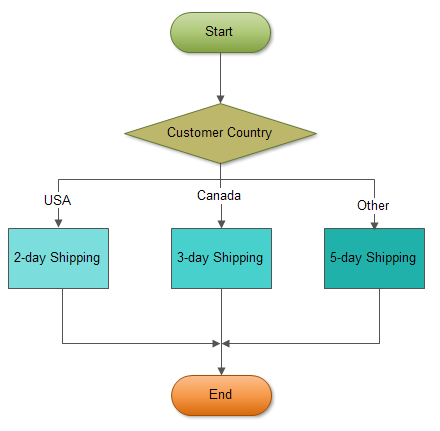
  • Inside the stored procedure, first we get the country of the customer based on the input customer number. Then we use the simple CASE statement to compare the country of the customer to determine the shipping period. If the customer locates in USA, the shipping period is 2-day shipping. If the customer is in Canada, the shipping period is 3-day shipping. The customers from other countries have 5-day shipping.
The following flowchart demonstrates the logic of determining shipping period.
MySQL CASE statement flowchart
The following is the test script for the stored procedure above:
MySQL CASE - Simple CASE statement output

Searched CASE statement

The simple CASE statement only allows you match a value of an expression against a set of distinct values. In order to perform more complex matches such as ranges you use the searched CASE statement. The searched CASE statement is equivalent to the IF statement, however its construct is much more readable.
The following illustrates the syntax of the searched CASE statement:
MySQL evaluates each condition in the WHEN clause until it finds a condition whose value is TRUE, then corresponding commands in the THEN clause will execute.
If no condition is TRUE , the command in the ELSE clause will execute. If you don’t specify the ELSE clause and no condition is TRUE, MySQL will issue an error message.
MySQL does not allow you to have empty commands in the THEN or ELSE clause. If you don’t want to handle the logic in the ELSE clause while preventing MySQL raise an error, you can put an empty BEGIN END block in the ELSE clause.
The following example demonstrates using searched CASE statement to find customer level SILVER, GOLD or PLATINUM based on customer’s credit limit.
If the credit limit is
  • greater than 50K, then the customer is PLATINUM customer
  • less than 50K and greater than 10K, then the customer is GOLD customer
  • less than 10K, then the customer is SILVER customer.
We can test our stored procedure by executing the following test script:
MySQL Searched CASE output