MySQL CASE Statement
Summary: in this tutorial, you will learn how to use MySQL CASE statements to construct complex conditionals.
Besides the IF statement, MySQL also provides an alternative conditional statement called MySQL CASE. The MySQL CASE statement makes the code more readable and efficient.
There are two forms of the
You use the simple
The
In case none of the
The following example illustrates how to use the simple
How the stored procedure works.

The following is the test script for the stored procedure above:

The following illustrates the syntax of the searched
MySQL evaluates each condition in the
If no condition is
MySQL does not allow you to have empty
The following example demonstrates using searched
If the credit limit is

Besides the IF statement, MySQL also provides an alternative conditional statement called MySQL CASE. The MySQL CASE statement makes the code more readable and efficient.
There are two forms of the
CASE statements: simple and searched CASE statements.Simple CASE statement
Let’s take a look at the syntax of the simple CASE statement:CASE statement to check the value of an expression against a set of unique values.The
case_expression can be any valid expression. We compare the value of the case_expression with when_expression in each WHEN clause e.g., when_expression_1, when_expression_2, etc. If the value of the case_expression and when_expression_n are equal, the commands in the corresponding WHEN branch executes.In case none of the
when_expression in the WHEN clause matches the value of the case_expression, the commands in the ELSE clause will execute. The ELSE clause is optional. If you omit the ELSE clause and no match found, MySQL will raise an error.The following example illustrates how to use the simple
CASE statement:- The
GetCustomerShippingstored procedure accepts customer number as an IN parameter and returns shipping period based on the country of the customer. - Inside
the stored procedure, first we get the country of the customer based on
the input customer number. Then we use the simple
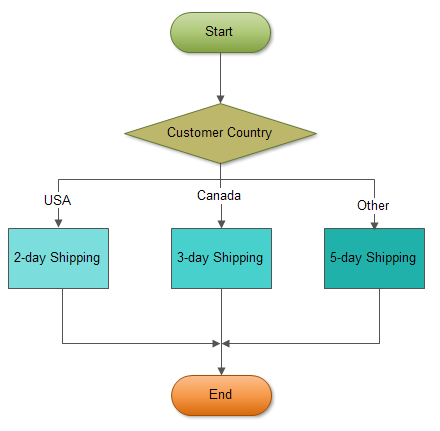
CASEstatement to compare the country of the customer to determine the shipping period. If the customer locates inUSA, the shipping period is2-day shipping. If the customer is inCanada, the shipping period is3-day shipping. The customers from other countries have5-day shipping.
The following is the test script for the stored procedure above:

Searched CASE statement
The simpleCASE statement
only allows you match a value of an expression against a set of
distinct values. In order to perform more complex matches such as ranges
you use the searched CASE statement. The searched CASE statement is equivalent to the IF statement, however its construct is much more readable.The following illustrates the syntax of the searched
CASE statement:WHEN clause until it finds a condition whose value is TRUE, then corresponding commands in the THEN clause will execute.If no condition is
TRUE , the command in the ELSE clause will execute. If you don’t specify the ELSE clause and no condition is TRUE, MySQL will issue an error message.MySQL does not allow you to have empty
commands in the THEN or ELSE clause. If you don’t want to handle the logic in the ELSE clause while preventing MySQL raise an error, you can put an empty BEGIN END block in the ELSE clause.The following example demonstrates using searched
CASE statement to find customer level SILVER, GOLD or PLATINUM based on customer’s credit limit.- greater than 50K, then the customer is
PLATINUMcustomer - less than 50K and greater than 10K, then the customer is
GOLDcustomer - less than 10K, then the customer is
SILVERcustomer.


No comments:
Post a Comment